ANSCER Robotics

Software That Understands Your Business, Not Just Your Robots

Robots move materials. Operations move businesses. ANSCER transforms business requests into autonomous execution through industry-specific business applications and configurable workflows.

Request demo

01 / 04

Fleet Management System

Centralized intelligence for monitoring, controlling, and optimizing every robot operation from a single platform.

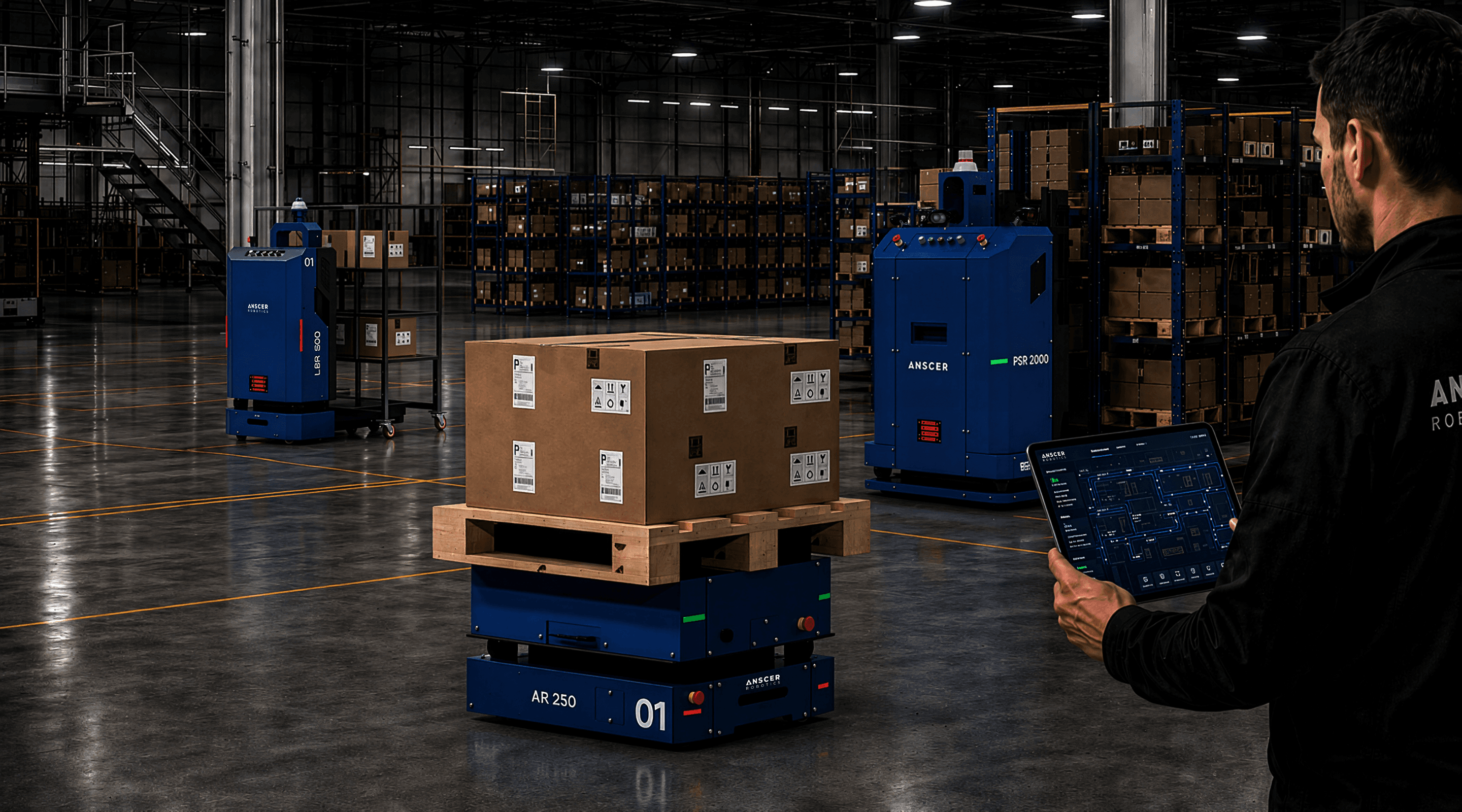
ANSCER fleet management system in operation

The ANSCER Fleet Management System (FMS) is the intelligent orchestration platform that coordinates, monitors, and manages the operations of multiple autonomous mobile robots (AMRs) within a facility. Acting as the central control layer for robotic operations, the ANSCER FMS enables seamless automation of material movement workflows across manufacturing plants, warehouses, and intralogistics environments.

Centralized Visibility and Control:

Monitor and manage robot fleets through a unified platform that optimizes traffic flow, task execution, and robot availability.
Synchronized Fleet Operations:

Coordinate individual robot actions into facility-wide operations that enhance efficiency, safety, and productivity.

Key Capabilities

Core Fleet Management Capabilities

Coordinate and manage the movement of multiple robots operating simultaneously within the same environment. The ANSCER FMS intelligently controls robot traffic, optimizes routing paths, prevents congestion, and ensures safe navigation throughout the facility.

Automatically assign transport missions and operational tasks to available robots based on factors such as robot location, battery status, workload, and task priority. This ensures balanced fleet utilization and optimized operational efficiency.

Intelligent Task Allocation

Maintain continuous robot availability with automated charging management. The system monitors robot battery levels in real time and autonomously dispatches robots to charging stations when required, minimizing downtime and maximizing operational uptime.

Charging Management

Configure, schedule, and monitor robot missions through a centralized management interface. Users can create transport workflows, assign priorities, and track mission execution across the entire fleet.

Mission Scheduling & Execution

Manage robot operations autonomously across production lines, warehouses, staging zones, and logistics areas. The FMS coordinates robot activities to ensure smooth material flow and uninterrupted operations.

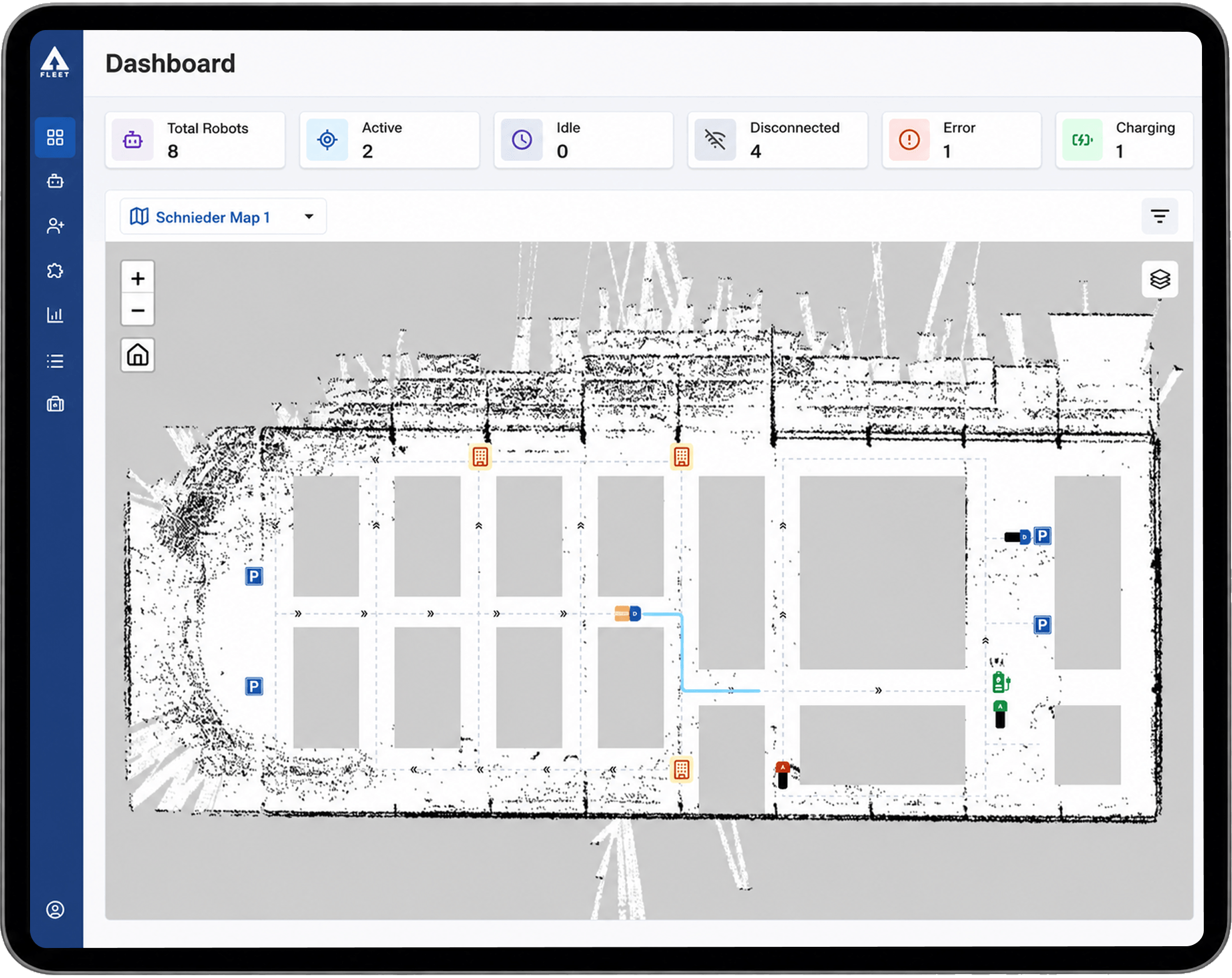
Gain complete visibility into fleet performance through live dashboards and operational monitoring tools. Track robot status, mission progress, traffic flow, and system health in real time.

Real-Time Monitoring & Control

Access the ANSCER FMS through a modern browser-based interface without requiring specialized software installation. The platform is compatible with Google Chrome, Mozilla Firefox, Microsoft Edge, Apple Safari

Benefits

Benefits of Intelligent
Fleet Management

Centralized Fleet Control

Manage multiple robots and workflows from a single unified platform.

Scalable Automation

Easily expand robot fleets and operational workflows as facility requirements grow.

Flexible Integration

Supports integration with MES, WMS, ERP, and other industrial software systems.

Enhanced Safety

Controlled robot traffic flow reduces congestion and improves operational safety within shared environments.

User-Friendly Operation

The intuitive web-based interface simplifies fleet management for operators and supervisors without requiring advanced technical expertise.

Improved Operational Efficiency

Optimize robot utilization and availability through automated opportunistic charging and intelligent task scheduling.

02 / 04

Business Application

Transform business logic into structured automated workflows that seamlessly integrate with robotic operations.

The ANSCER Business Application Layer bridges operational requirements and robotic execution, translating business processes into executable robotic workflows. Built on a library of configurable, industry-specific applications, it enables operators to interact through familiar business actions while automatically managing workflow execution and robot coordination. Organizations can automate material movement without complex software development or extensive engineering effort.

Supported Industries

Electrical & ElectronicsAutomotiveTextileWarehousing & 3PLPharmaceuticals

Key Capabilities

Core Business Application Capabilities

Configure and manage operational workflows with ease. The platform translates business processes into structured robotic task sequences

Workflow Orchestration

Adapt workflows to meet the operational requirements of industries including Electrical & Electronics, Automotive, Textile, Warehousing & 3PL, and Pharmaceuticals.

Industry-Specific Customization

Simplify automation for operators with user-friendly interfaces, calling stations, dashboards, and APIs that enable single-click task execution without requiring technical expertise.

Intuitive User Experience

Convert high-level operational commands into executable robotic actions, including navigation, routing, material handling, load transfers, and workflow-driven task execution.

Task Abstraction

BENEFITS

Turning Industry Workflows Into Autonomous Operations

Operational Abstraction

Separates business logic from robot control logic

Scalability

Supports multi-industry deployments

Flexibility

Multiple implementation approaches (prebuilt, low-code, integrated)

Reduced Engineering Effort

Minimizes need for custom coding

User-Centric Design

Simplifies interaction for non-technical operators

03 / 04

Process Flow Manager

Build, configure, and modify robot workflows using a visual drag-and-drop interface without writing code.

The Process Flow Manager enables users to create, configure, and modify operational workflows for different business use cases within a facility. Designed for industries such as electrical & electronics, textiles, industrial automation, warehousing, and 3PL, the platform helps standardize and automate repetitive material handling operations across facilities.

Key Features

Drag & Drop ConfigurationNo-Code Logic DesignVisual Workflow BuilderMulti-Robot Coordination

WORKFLOW CONFIGURATION

Build Robot Workflows Without Writing Code

The Process Flow Manager enables users to create robotic workflows through a drag-and-drop, block-based interface, allowing teams to automate processes without complex programming.

Move

Navigate the robot between locations.

Move workflow - Process Flow Manager

Pick

Wait

Drop

BENEFITS

Designed for Flexible and
Scalable Automation

Flexible Workflow Configuration

Create and modify process flows quickly to adapt to changing operational requirements.

Industry-Specific Adaptability

Support diverse material handling workflows across manufacturing, warehousing, and logistics environments.

Simplified Automation

Transform complex operational activities into easy-to-manage robotic workflows.

Scalable Operations

Standardize and replicate workflows across multiple plants, production lines, or facilities.

Reduced Operational Dependency

Minimize manual coordination and improve process consistency through automated task execution.

04 / 04

Analytics Platform

Turn Operational Data Into Actionable Intelligence

ANSCER analytics platform in use

The ANSCER Analytics Platform provides comprehensive operational insights into robot fleets, missions, and facility workflows. Designed to support data-driven decision-making, the Analytics layer transforms real-time operational data into actionable intelligence that helps optimize robot performance, improve workflow efficiency, and enhance overall facility productivity.

By continuously collecting and analyzing data from robot operations, mission requests, traffic flow, and system events, the platform enables users to monitor key performance indicators, identify operational bottlenecks, and proactively improve automation performance across facilities.

Key Capabilities

Turning Industry Workflows Into Autonomous Operations

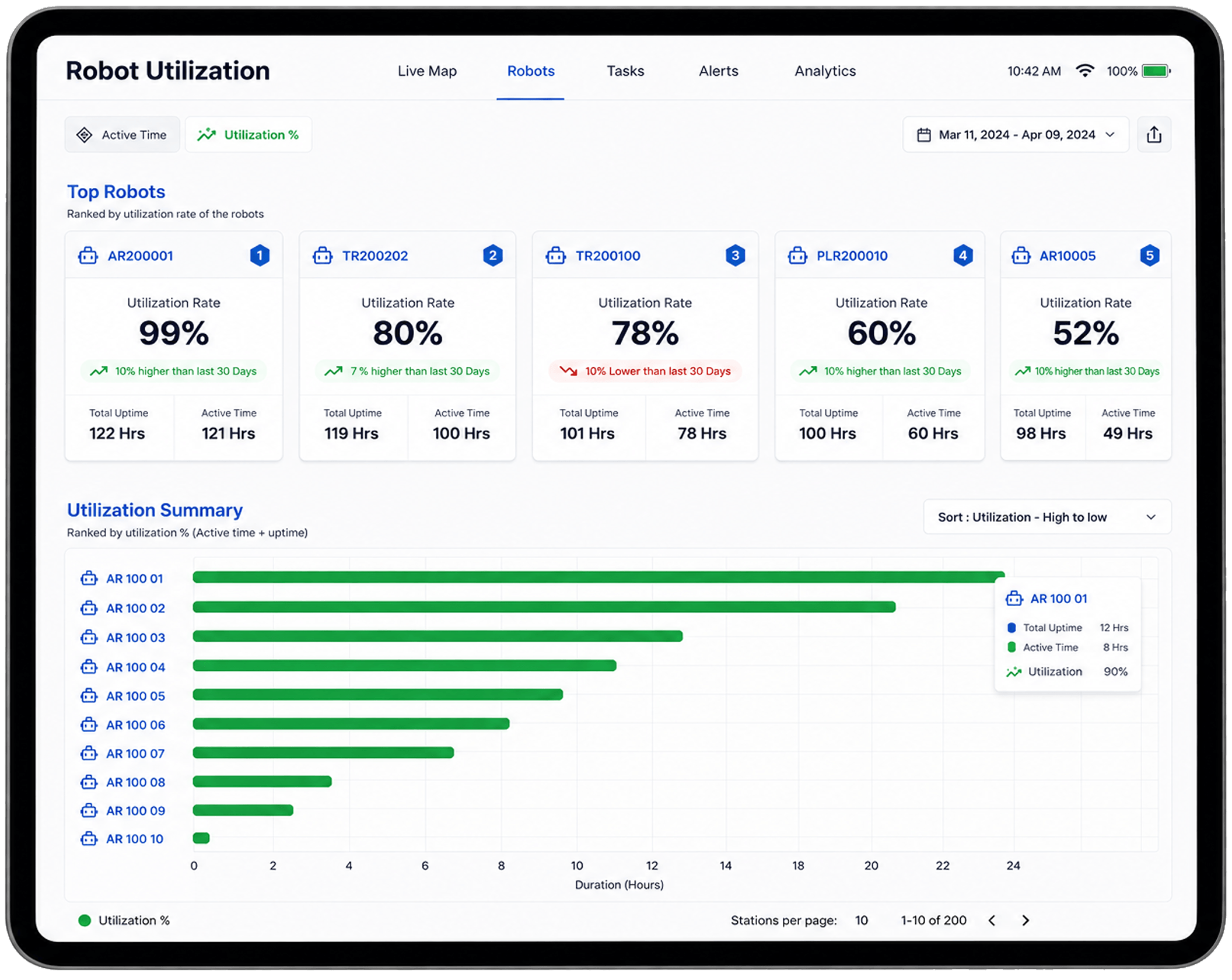
Utilization Reports

Utilization Reports

Monitor robot activity, operational efficiency, and fleet performance through detailed utilization reports. The platform provides visibility into robot active time, idle time, mission execution, and utilization rates to help maximize fleet productivity.
KPI Dashboards

KPI Dashboards

Access centralized dashboards that display critical operational metrics and performance indicators in real time.

Key analytics include:
Request success rateMission volumeRobot utilization rateActive stations and storesFleet performance trendsOperational efficiency metrics
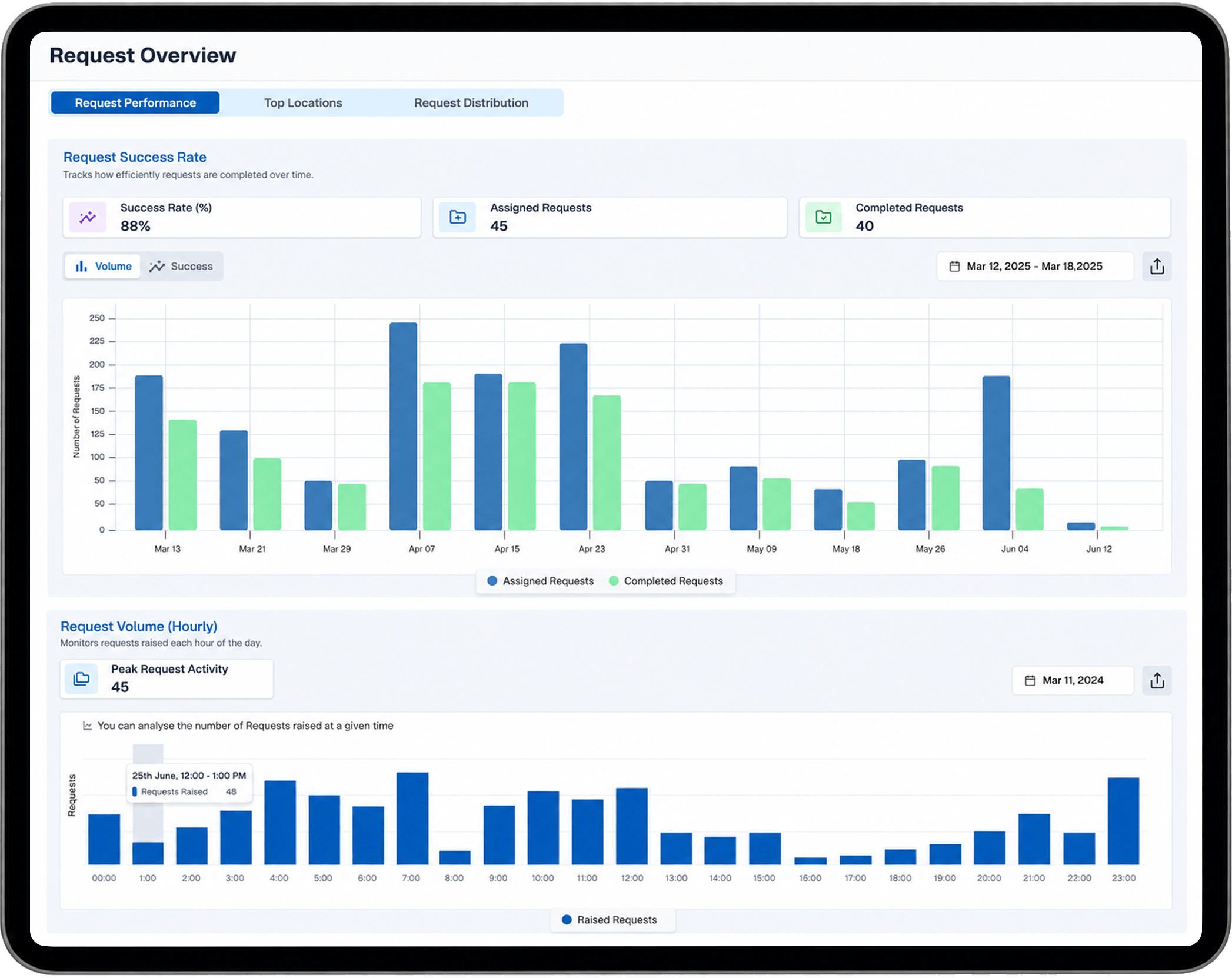
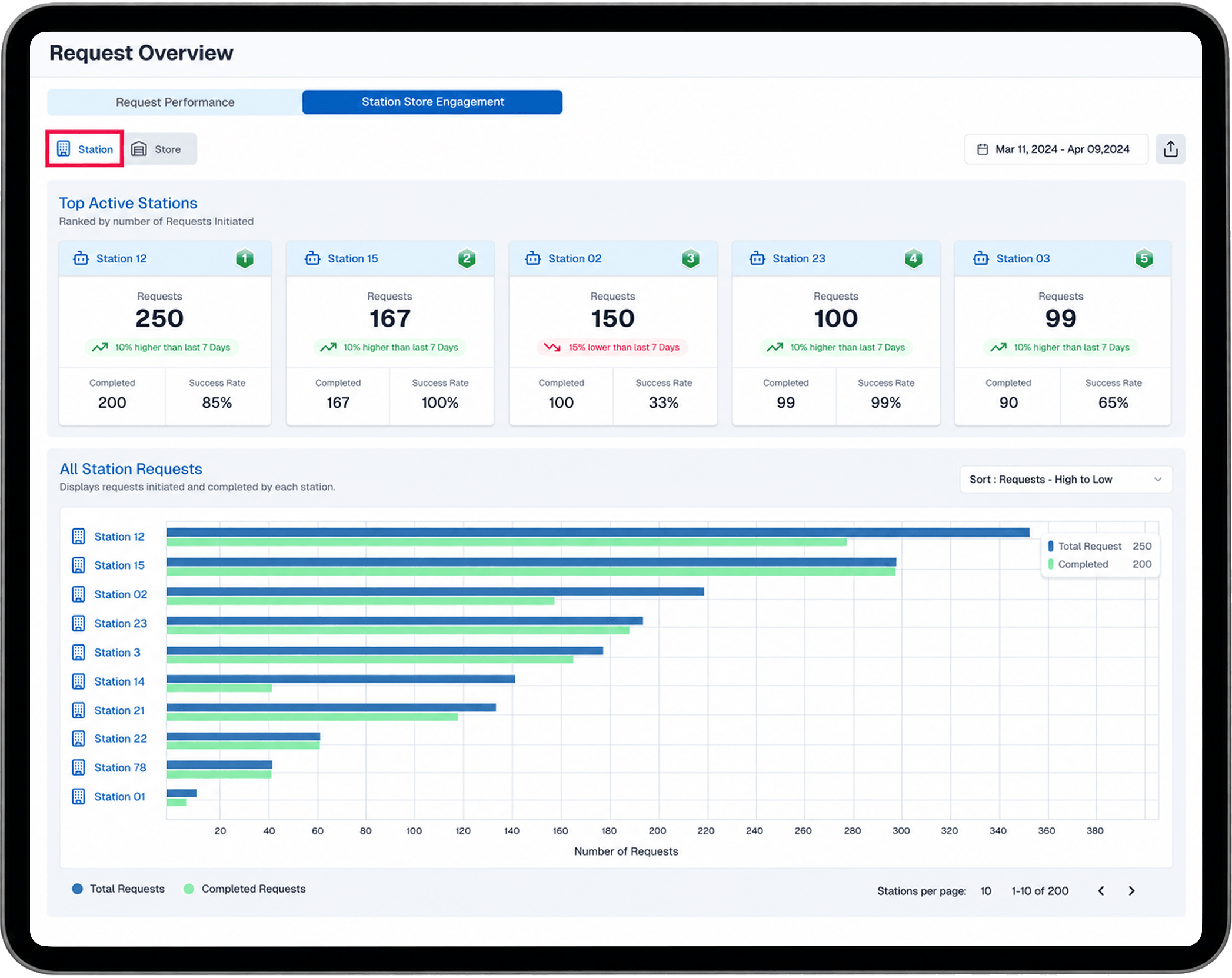
Request Overview Analytics

Request Overview Analytics

Analyze all mission and transport requests generated across stations, production areas, and storage locations.

The Request Overview module provides detailed insights into:

Total request volumeCompleted and failed requestsSuccess ratesHigh-demand stations and storesWorkflow activity trends

This data enables operators to identify operational patterns and optimize material flow processes.
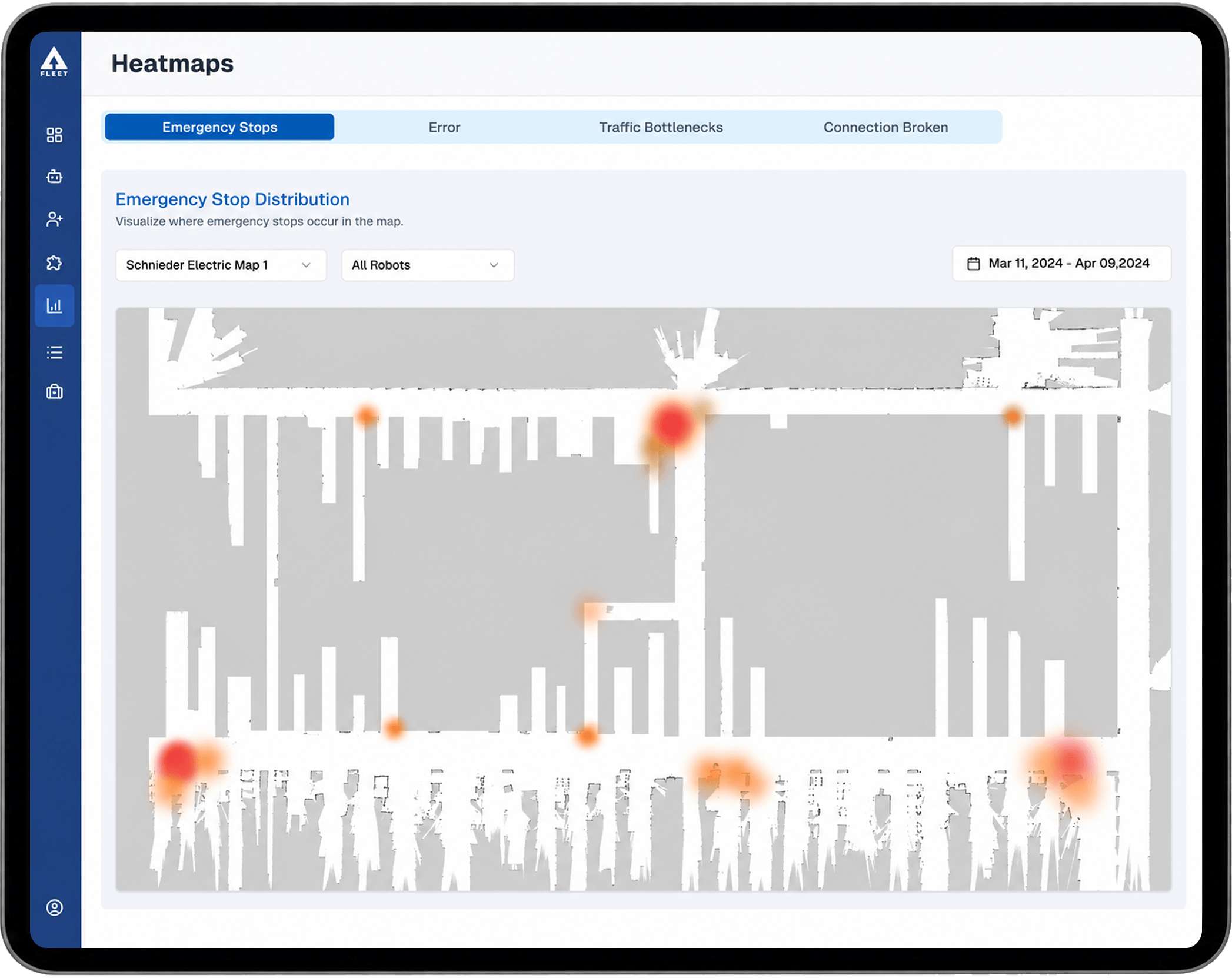
Heatmaps

Heatmaps

Visualize operational incidents and traffic patterns across facility maps using intelligent heatmap analytics. The Heatmap module helps identify high-activity and high-risk areas within the facility by displaying:
Emergency stop locationsRobot errorsTraffic congestion zonesConnection interruptionsNavigation bottlenecks
Predictive Alerts

Predictive Alerts

Receive proactive notifications and predictive alerts related to robot performance, traffic congestion, operational anomalies, and potential system issues. Predictive insights help reduce downtime and improve operational continuity.
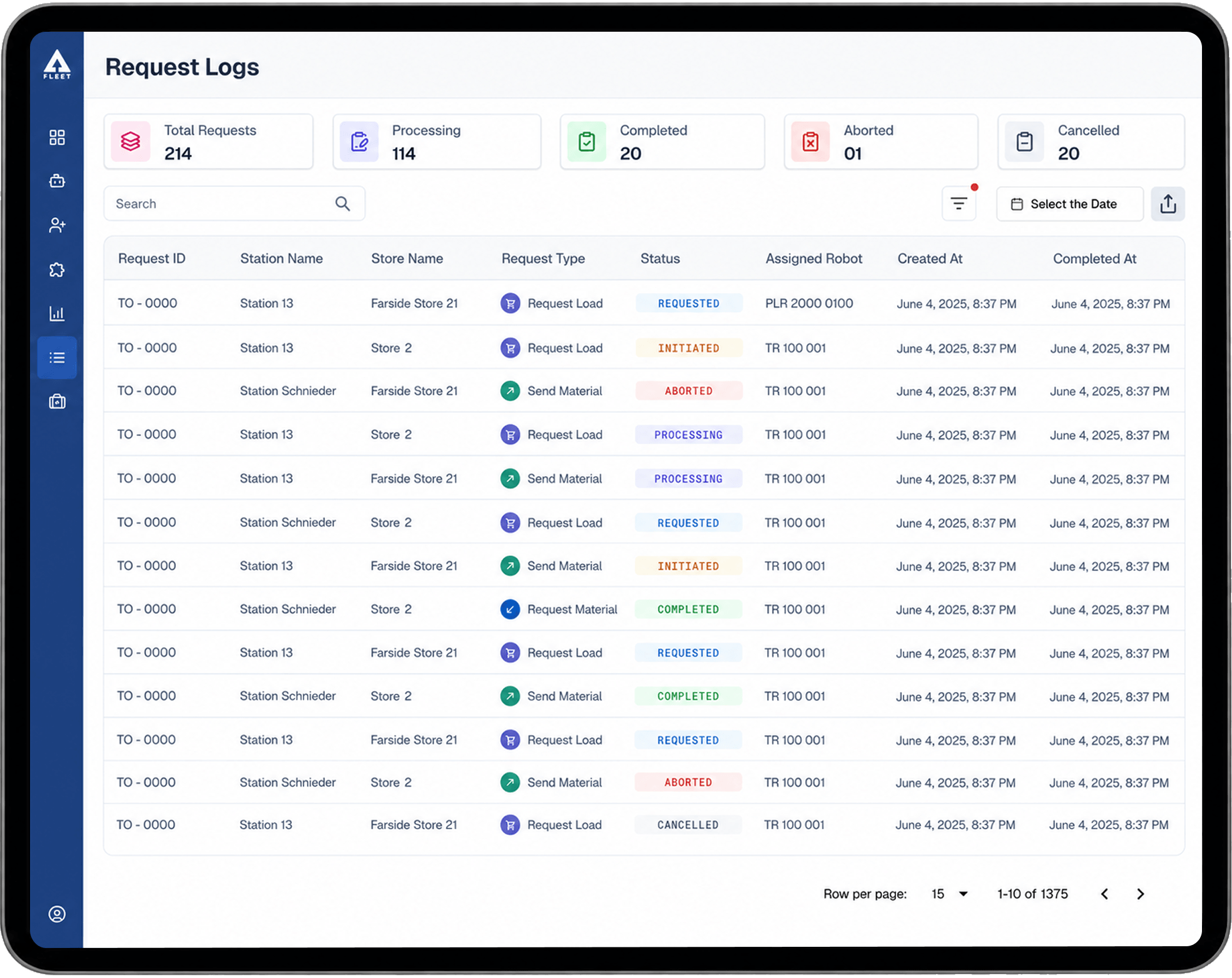
Historical Data Filtering

Historical Data Filtering

Filter analytics and operational reports based on custom date ranges, robots, locations, missions, or event types to support detailed performance analysis and reporting.

BENEFITS

Turning Operational Data Into Actionable Insights

Improved Operational Visibility

Gain real-time and historical insights into robot operations, fleet performance, and workflow efficiency.

Data-Driven Optimization

Use operational analytics to identify bottlenecks, improve traffic flow, and optimize robot utilization.

Increased Fleet Efficiency

Monitor utilization rates and mission trends to maximize robot productivity and reduce idle time.

Faster Issue Identification

Heatmaps and predictive alerts help quickly detect operational issues, congestion areas, and recurring system events.

Enhanced Decision Making

KPI dashboards and analytics reports support informed operational planning and continuous process improvement.

Scalable Performance Monitoring

Analyze and manage performance across single or multi-site robotic deployments from a centralized platform.

Continuous Improvement

Leverage historical operational data to refine workflows, improve system reliability, and enhance overall automation performance.

Experience automation that understands your operations.

Book your demo now and experience ANSCER in action.

Book a demo